

Modern teams lose more time managing work than actually doing it. Research indicates that more than 60% of employees spend their time tracking down updates, files, or approvals instead of focusing on real work, and almost one-third of projects fail due to poor communication and unclear priorities. That’s where Monday project management software steps in. It gives teams a clear, visual way to organize daily work without the overwhelm of endless emails, spreadsheets, or disconnected tools. Everything lives in one structured space, making work feel lighter, faster, and far more manageable.
As teams grow, complexity grows with them. Deadlines shift, responsibilities blur, and progress becomes harder to track. Monday.com solves this by turning work into simple, visual boards that show who’s doing what, when it’s due, and how far along it isall in real time. With timelines, status tracking, and quick check-ins, nothing slips through the cracks, and collaboration stays smooth without extra effort.
In this guide, you’ll explore what Monday project management software really is, its key features, and why so many teams rely on it to stay productive. You’ll also discover top alternatives designed for different team sizes and work styles. By the end, choosing the right workflow tool won’t feel confusing; it’ll feel like a smart, confident decision.
What Is Monday Project Management Software?
Monday project management software is a simple work platform that helps teams plan tasks. Monday.com helps teams track progress and stay organized in one shared workspace, eliminating the constant switching between apps. Research shows that employees use an average of 9–12 tools daily, and nearly 40% say this tool overload directly hurts productivity. Monday solves this by bringing projects, files, conversations, and updates into a single, easy-to-navigate platform. Its visual boards, timelines, and lists turn daily work into something clear and predictable, reducing the confusion that often builds up in fast-moving projects. It feels like transforming a cluttered desk into a clean, structured system that naturally guides everyone from start to finish.
Key Points That Explain Monday Clearly
- Displays tasks using boards, lists, timelines, and calendars
- Keeps all project information in one centralized workspace
- Makes it easy to assign ownership and track progress in real time
- Cuts down repetitive work with simple, no-code automation
- Adapts easily to different team sizes and workflow styles
Teams often choose Monday because it brings order during high-pressure periods. Studies suggest that real-time visibility can improve team efficiency by up to 25%, simply because people no longer wait for updates or search for the latest files. This is especially important when following a specific Methodology in Project Management, such as Agile or Waterfall, where clear workflow structure and real-time tracking are essential for success.
Features of Monday Project Management Software
Monday project management software offers simple, helpful tools that make project handling easier. Many teams call it one of the Best Project Tracking Software options because its features bring clarity to daily work, reduce unnecessary steps, and keep teams connected in one place. Everything is visual and easy to follow, which helps teams stay organized even during busy days.
- Custom Boards and Workflows: Teams can build boards that match their own process. Tasks, steps, and priorities appear clearly, making it easier to understand progress at a glance.
- Easy Automations: Routine actions move automatically, like sending updates or shifting tasks between stages. This saves time and keeps the workflow smooth.
- Time Tracking and Schedules: Timelines and calendars show deadlines, workload, and progress. Teams can plan and avoid last-minute pressure.
- Simple Team Collaboration: Comments, tags, files, and updates stay in one spot. This reduces long email chains and keeps communication clear.
- Useful Integrations: It connects with many common work tools, bringing everything into one organized space.
- Quick Reports and Dashboards: Dashboards show progress, delays, and upcoming tasks in clean visuals. Teams can make decisions faster with a clear overview.
Together, these features create a clear and structured workflow where teams always know what’s happening and what comes next—helping work move forward smoothly.
How to Use Monday Project Management Software
Using Monday project management software is simple because everything works through visual steps, just like many modern Project Management Apps. You start by setting up a board, adding tasks, and arranging your workflow in a way that feels natural to your team.
1. Create Your First Board

Go to: Workspace → Boards → Create Board → Choose Template / Blank Board
Start by selecting a board type that matches your project. You can pick from templates or build a board from scratch. Boards are fully customizable, so you can add columns for deadlines, owners, progress stages, or files. This setup becomes the backbone of your project. It shows everything in clear sections that help teams understand what needs attention. As work grows, you can add more sections or adjust the layout without starting over.
2. Add Tasks and Assign Work
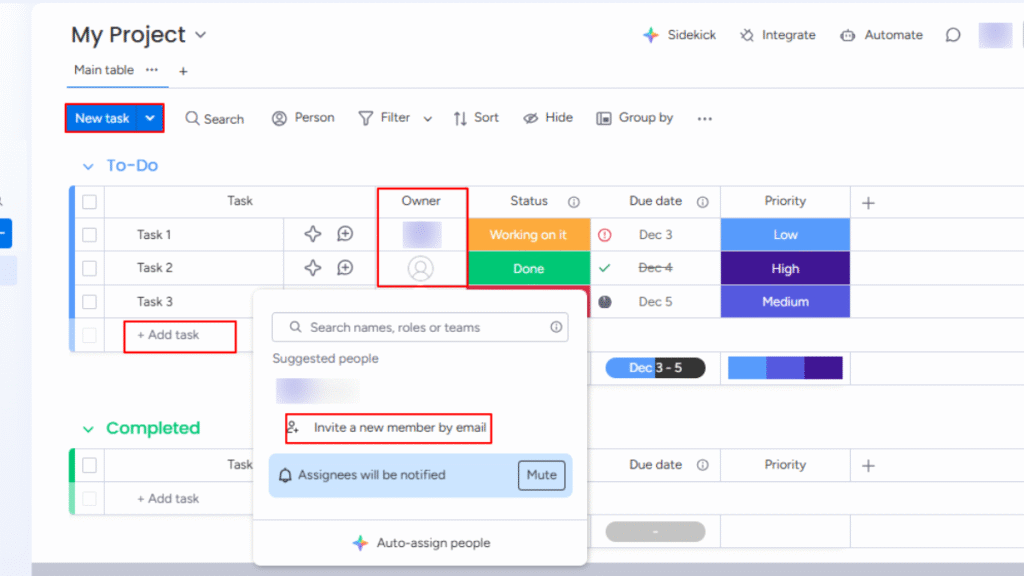
Go to: Board → Add Item → Enter Task Details
Once the board is ready, create tasks with simple details like the name, due date, assigned person, and status. You can break big tasks into smaller steps to make progress easier to track. Assigning each task ensures that every responsibility has a clear owner. Team members can update their work directly, so the board always reflects real progress. This reduces follow-up messages and keeps the project flowing.
3. Set Up Basic Automations
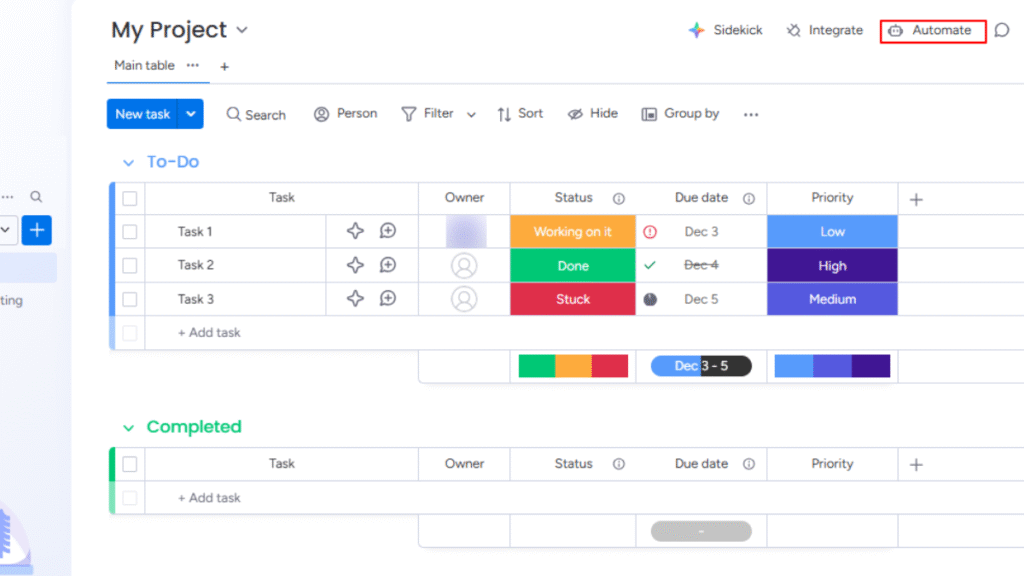
Go to: Board → Automations → Add Automation
Automations help remove repetitive actions that take extra time. You can set rules that move tasks to a new stage when the status changes. You can also create automatic reminders for upcoming deadlines or notifications when someone updates a task. These small automations create a smoother rhythm for the team. They also reduce the chances of missed tasks or forgotten updates.
4. Use Timelines and Calendars
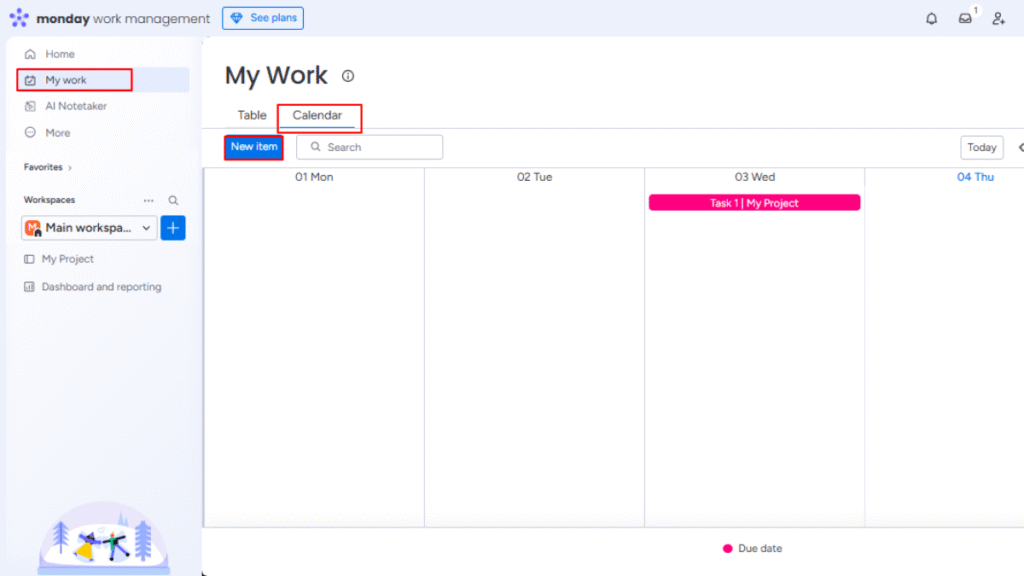
Go to: Board → Views → Timeline / Calendar
The timeline view shows how tasks stretch across days or weeks. This helps teams plan workloads without overlap. The calendar view is useful for checking what is due soon and spotting busy periods early. These views make planning easier because everything appears in a simple map-like layout. Teams can shift dates, extend tasks, or balance workloads with just a few clicks.
5. Collaborate Inside the Tasks
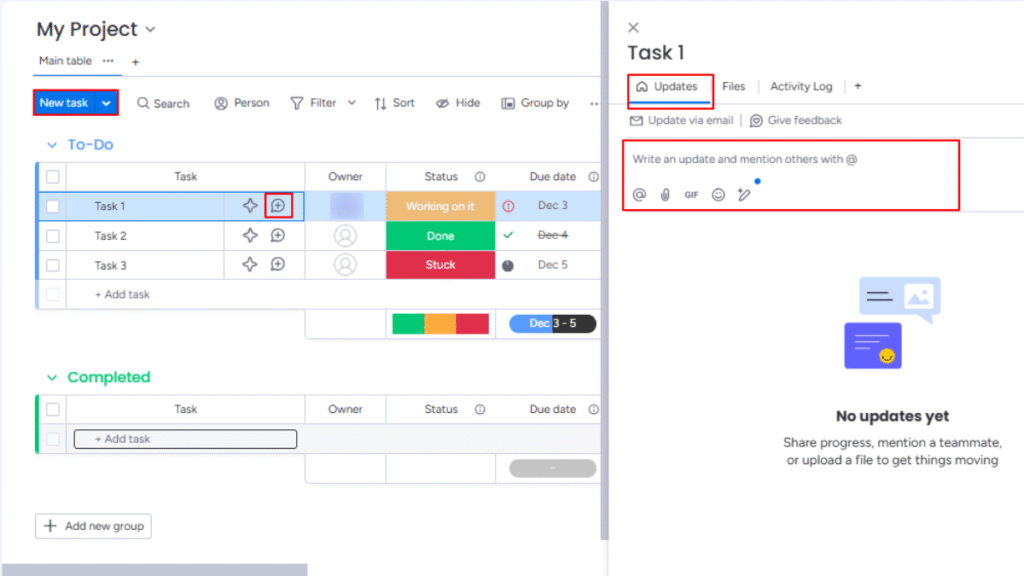
Go to: Task Item → Updates / Files
Every task has its own space for comments, attachments, and discussions. Team members can share updates, ask questions, or tag others for quick responses. This way, all important information stays within the task instead of getting lost in chats or emails. Files and links sit in the same place, making it easier to find what you need later. This style of communication keeps everything clean and organized.
6. Track Progress Through Dashboards
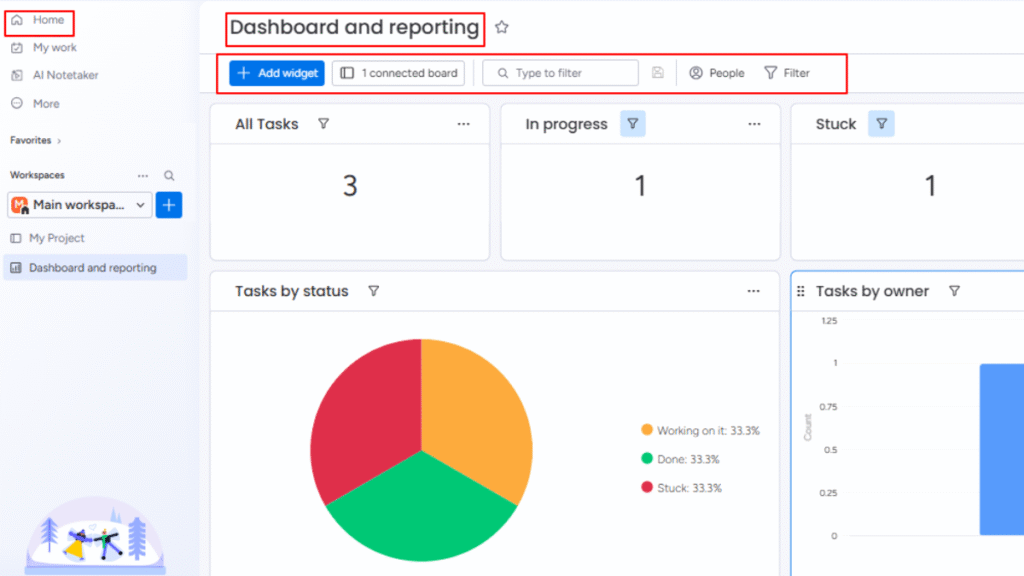
Go to: Workspace → Dashboards → Create Dashboard
Dashboards turn project details into visual summaries. You can view task status, team workload, deadlines, and overall progress in charts or counters. These visuals help teams understand where things stand without reading through every task. It also becomes easier to spot delays early, so adjustments can be made. Dashboards create a simple snapshot of how well the project is moving.
Why Choose These Tools?
Choosing the right project management software can significantly improve how smoothly a team operates. The right tools bring clarity, structure, and real-time visibility, helping teams stay organized and reduce daily stress.
Whether it’s Monday, Trello, Asana, ClickUp, Notion, or Wrike, each platform is built to simplify workflows, keep tasks visible, and support collaboration across teams. Using the right tool feels like having a clear roadmap, showing what to do next instead of navigating through confusion.
Key Reasons to Choose the Right Tool
- Clear Organization: Keeps tasks, files, and updates in one centralized space.
- Better Collaboration: Enables teams to communicate and share updates without cluttered email threads.
- Time-Saving Automation: Reduces manual effort by automating repetitive actions.
- Visual Progress Tracking: Boards, dashboards, and timelines make it easy to see project status at a glance.
- Flexibility for Teams: Adapts to different team sizes, project types, and workflow styles.
By choosing the right project management software, teams gain more than a digital workspace, they gain clarity, efficiency, and confidence. It minimizes missed deadlines, simplifies daily coordination, and allows teams to focus on work that truly drives results.
Comparing Monday With Other Alternatives
| Tool | Best For | Ideal Team Size | Starting Price | Updates & Activity Tracking | Integrations | User Reviews (Avg) |
|---|---|---|---|---|---|---|
| Monday.com | Structured workflows & visual planning | 5–200+ users | ~$9/user/month | Real-time updates, activity logs, notifications | ~200+ native connections | 4.6/5 |
| Trello | Simple task tracking | 1–20 users | ~$5/user/month | Card activity & basic notifications | ~Power-Ups (integrations) | 4.5/5 |
| Asana | Task dependencies & team planning | 5–100 users | ~$10.99/user/month | Task history, timeline updates | ~180+ integrations | 4.4/5 |
| ClickUp | All-in-one flexibility | 3–150 users | ~$7/user/month | Detailed task activity & change logs | ~1000+ integrations | 4.7/5 |
| Notion | Custom workflows & documentation | 1–50 users | ~$8/user/month | Page history & manual updates | ~50+ integrations (growing) | 4.6/5 |
| Wrike | Complex projects & reporting | 20–500+ users | ~$9.80/user/month | Advanced reporting & live updates | ~400+ via Integrate | 4.3/5 |
Conclusion
Monday project management software and its alternatives have changed how teams manage work. In a world where projects can easily become chaotic, a central platform brings clarity and focus. Teams no longer waste time hunting for updates, tracking emails, or managing scattered files. Instead, they can see the full picture at a glance and stay on top of deadlines.
Monday and its competitors are frequently regarded as the Best IT Project Management Software for teams that need usability, automation, and collaboration in one place. Features like boards, timelines, automations, and dashboards make daily work more structured and manageable. Even complex projects benefit from visual progress tracking, clear task assignments, and smoother communication. Choosing the right tool is more than adopting software it’s about creating a workflow that supports the team and helps finish projects on time.
FAQs
Monday is a visual work management platform that helps teams plan, track, and manage projects using boards, timelines, automations, and dashboards.
Yes, Monday works for small teams, but it is most powerful for teams that need structured workflows and clear project visibility.
Yes, Monday can replace Trello or Asana, especially if your team needs more automation, reporting, and custom workflows.
Yes, Monday offers automation to reduce repetitive tasks like status updates, reminders, and task movements.
Top alternatives include Trello, Asana, ClickUp, Notion, and Wrike. Each fits different team sizes and workflow needs.
Monday is user-friendly with a simple visual interface, but teams may need time to customize boards and workflows based on their project needs.
