
Managing multiple projects, deadlines, and team members can feel like trying to conduct an orchestra without a sheet of music. Tasks pile up, communications get lost, and deadlines slip through the cracks. This is where Jira project management software comes in. It acts like a conductor for your projects, orchestrating every task, sprint, and workflow in harmony. Centralizing project management, it allows teams to see the big picture while keeping an eye on the tiniest details.
Next, Jira empowers teams to collaborate effectively, whether members are in the same office or spread across continents. It provides a digital workspace where tasks, updates, and feedback flow seamlessly. Additionally, its features like Agile boards, workflow automation, and reporting dashboards make it easier to track progress, identify bottlenecks, and make data-driven decisions. With Jira, teams spend less time chasing updates and more time completing meaningful work.
In summary, adopting this software is essential for modern teams that want to stay organized and productive. It strengthens communication and drives efficient milestone completion. Teams can now transform chaos into structure, making project execution smoother and more predictable.
What Is Jira Project Management Software?
Jira project management software is a versatile tool that helps teams organize, track, and manage projects efficiently. Instead of juggling tasks across spreadsheets, emails, and scattered notes, teams centralize all project activities in one platform. Agile and Scrum teams favor Jira because it simplifies sprint planning, issue tracking, and task prioritization. Using Jira, teams can visualize their work, collaborate effectively, and ensure that nothing falls through the cracks in their Methodology in Project Management.
Key Features of Jira Project Management Software:
- Centralized Task Management: Organize all tasks, subtasks, and assignments in one place, making it easy to track progress and responsibilities.
- Agile Boards: Visualize your workflow with Kanban and Scrum boards, enabling teams to monitor tasks at a glance and adapt quickly.
- Customizable Workflows: Tailor Jira to fit your team’s unique project processes, ensuring that every project follows a clear, structured path.
- Progress Tracking and Reporting: Gain insights with dashboards, charts, and reports that measure milestones, team performance, and project health.
- Collaboration Tools: Communicate directly on tasks, share updates, leave comments, and attach files to streamline team interactions.
- Issue and Bug Tracking: Identify, assign, and resolve issues efficiently, keeping projects on schedule and reducing errors.
With Jira project management software, teams can transform complex, chaotic projects into structured, trackable workflows. It promotes accountability, improves communication, and ensures timely project delivery, allowing teams to focus on completing meaningful work rather than chasing updates.
In today’s fast-paced work environment, managing multiple projects efficiently can be challenging. This is where Jira software becomes essential. It not only organizes tasks but also ensures teams stay aligned, meet deadlines, and maintain high productivity. By centralizing workflows, Jira reduces confusion and keeps everyone focused on the most important priorities.
How to Use Jira Project Management Software
Using Jira project management software may feel intimidating initially, but its intuitive design makes it easy for teams of all sizes to get started. Jira allows you to structure your projects, track progress, and collaborate efficiently, ensuring that no task is overlooked.
Here’s a simple setup walkthrough:
1. Set Up Your Project:
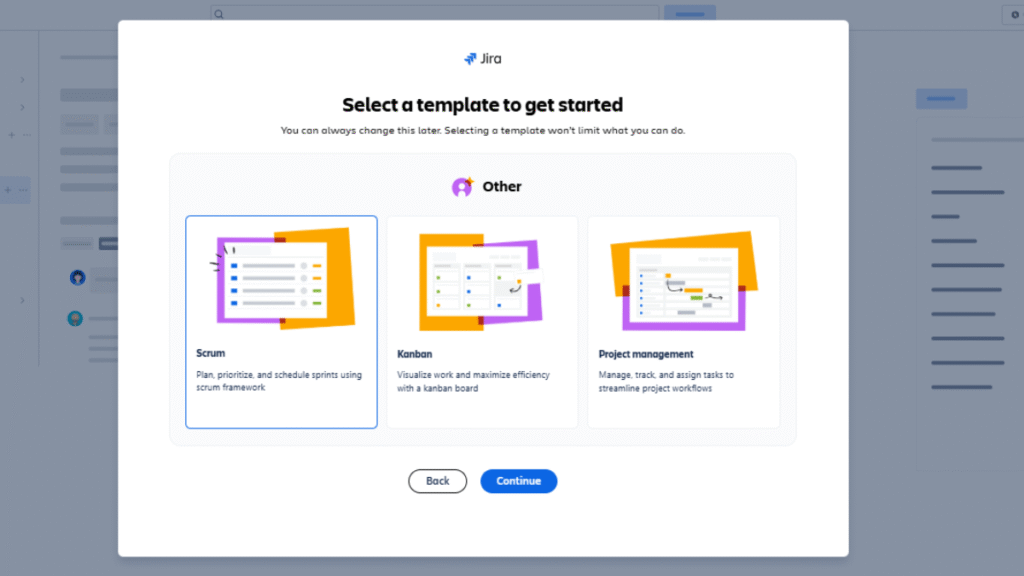
Begin by creating a new project in Jira software and select a template that fits your team’s workflow. For visual task tracking, choose the Kanban template, which displays tasks as cards moving through stages like “To Do,” “In Progress,” and “Done.” If your team works in sprints, the Scrum template helps plan, prioritize, and track tasks within fixed time frames, complete with backlog management and burndown charts. For simpler projects, the basic project plan provides a straightforward task list and timeline. Each template comes with preloaded tools and customizable fields to guide your workflow. Selecting the right template ensures your project starts organized, aligned with team needs, and ready for smooth execution.
2. Add Team Members:
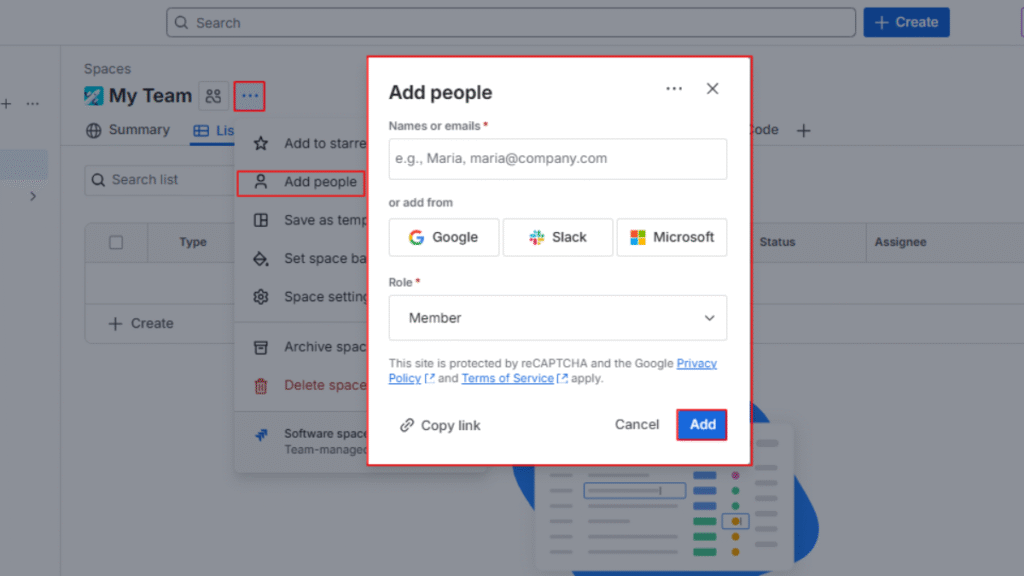
Next, invite your team to the project, assign specific roles, and define permissions for each member. This ensures that everyone knows exactly what they are responsible for and can access the tasks they need without unnecessary hurdles. Clear roles prevent confusion, reduce overlapping work, and foster accountability. By setting permissions carefully, you also maintain project security while allowing smooth collaboration, so every team member can contribute efficiently and stay aligned with overall goals.
3. Create Tasks and Backlogs:
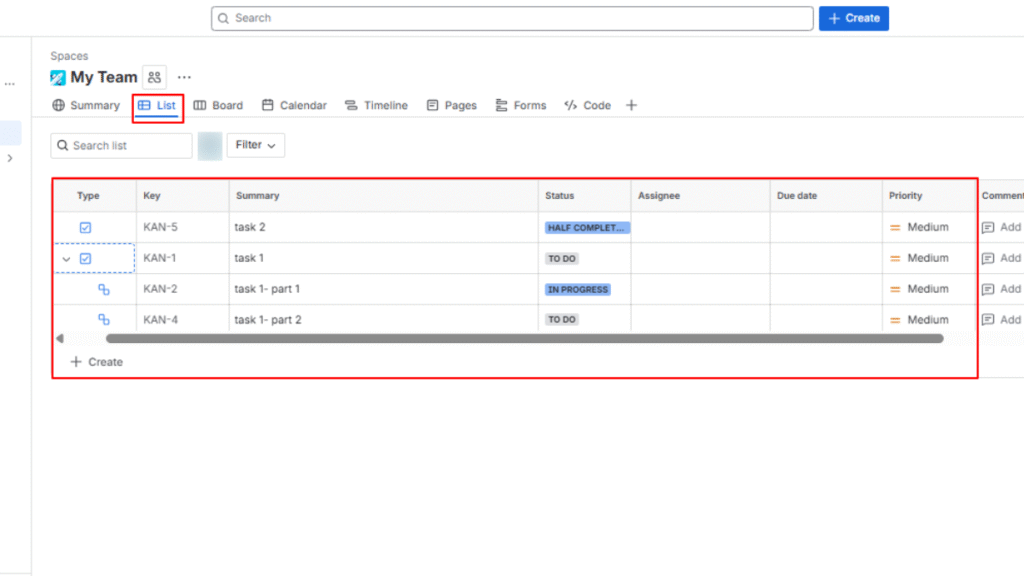
After setting up your team, create tasks and organize them into a backlog. Break down the project into smaller, manageable tasks and subtasks, and assign them to the right team members. Prioritize tasks based on deadlines and importance so everyone knows what to focus on first. The backlog acts as a dynamic roadmap, allowing teams to plan work effectively and adjust priorities as the project evolves. By clearly defining tasks and maintaining a structured backlog, you ensure that no work is overlooked and progress remains smooth and organized.
4. Visualize Workflows:
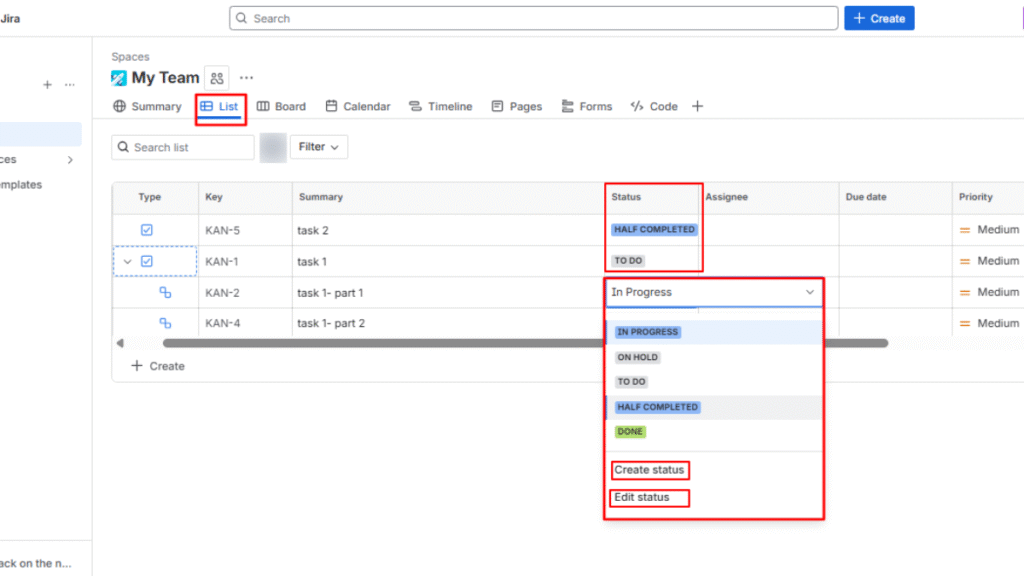
Use Jira’s Kanban or Scrum boards to visualize your team’s workflow and track progress at a glance. Tasks move across columns representing stages like “To Do,” “In Progress,” and “Done,” making it easy to see what’s being worked on and what’s completed. Visualizing workflows helps spot bottlenecks quickly, balance workloads, and ensure deadlines are met. By having a clear view of the project’s flow, teams can adapt to changes faster, collaborate more effectively, and maintain steady progress without confusion or missed tasks.
5. Monitor Progress:
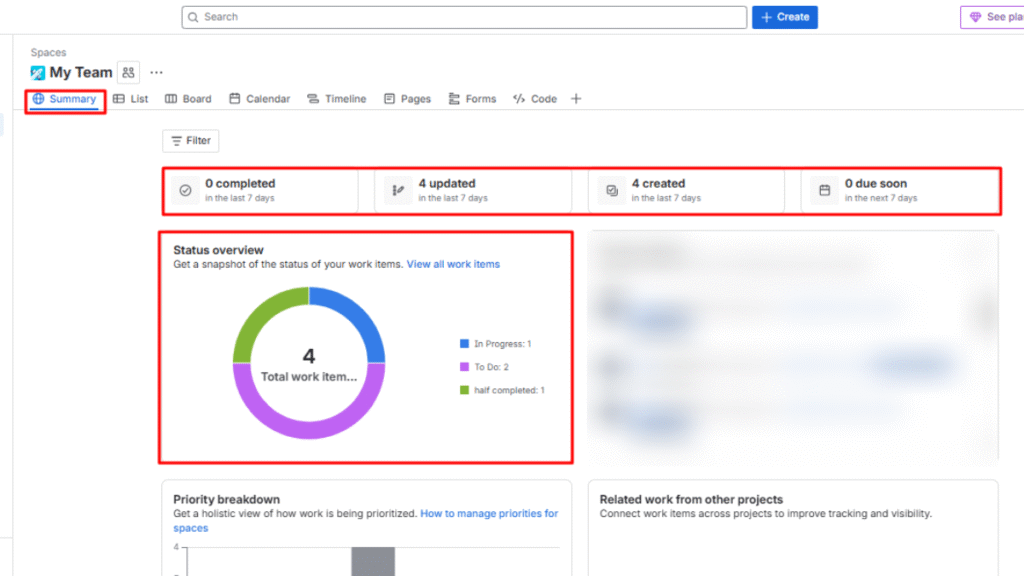
Set up dashboards and reports in Jira to monitor project progress and team performance in real time. Dashboards provide a visual overview of milestones, completed tasks, and upcoming deadlines, while reports offer detailed insights into productivity, bottlenecks, and sprint performance. Regularly reviewing these metrics helps managers make informed decisions, adjust workloads, and keep the project on track. By tracking progress effectively, teams stay aligned, maintain accountability, and ensure that every milestone is achieved efficiently without delays or confusion.
6. Collaborate and Communicate:
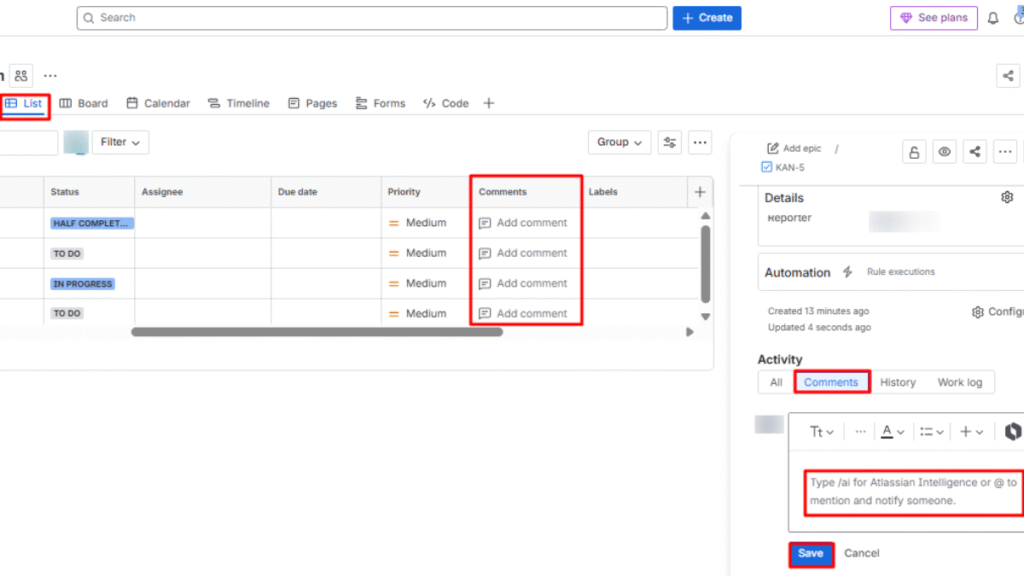
Encourage your team to use Jira’s built-in collaboration tools to communicate directly on tasks. Team members can leave comments, share files, provide updates, and tag colleagues to keep everyone informed. This centralized communication reduces the need for long email chains or scattered messages across different apps. By collaborating within Jira, teams stay aligned, resolve issues faster, and maintain a clear record of discussions, making project execution smoother and ensuring that everyone is on the same page at all times.
7. Automate Repetitive Tasks:
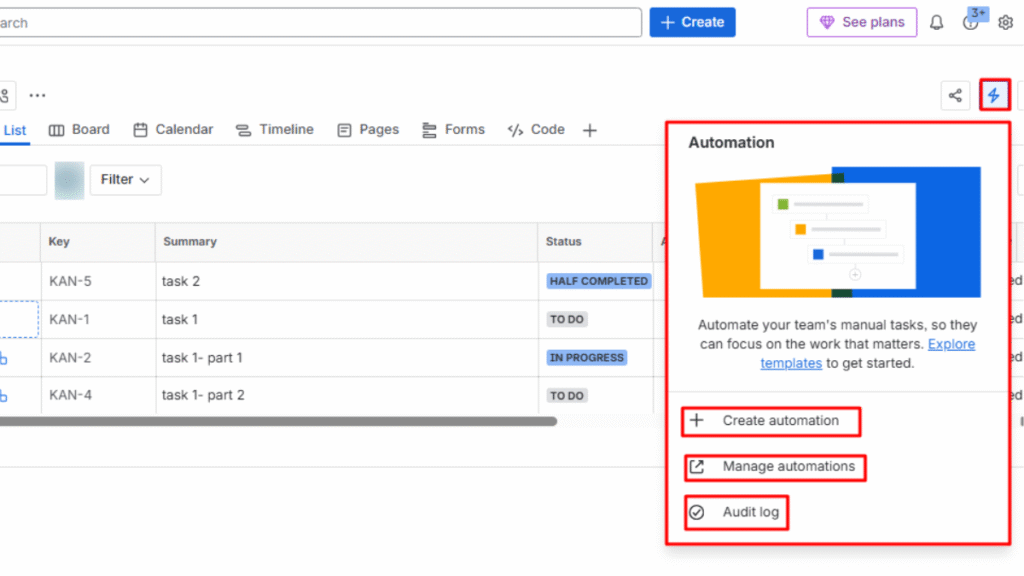
Take advantage of Jira’s automation features to reduce repetitive work and save time. You can set rules for automatic notifications, task updates, approvals, and recurring actions, ensuring consistency across workflows. Automation minimizes human errors, keeps team members informed, and allows them to focus on more critical, value-driven tasks. By streamlining routine processes, Jira helps teams work smarter, maintain productivity, and ensure that projects progress smoothly without unnecessary delays or confusion.
By following these steps, teams can fully leverage Jira to manage complex projects with clarity, structure, and efficiency. In summary, implementing Jira project management software turns complex projects into manageable workflows, making collaboration more effective and productive. It also ranks among the top Free Online Project Management Tools for teams that need powerful features without a high cost.
Why Choose Jira Project Management Software
Choosing the right project management tool can make a world of difference in team productivity, and Jira project management software stands out as one of the most reliable options. It helps teams stay organized, maintain accountability, and stay aligned, making it suitable for projects of all sizes. Agile project management tools help teams manage iterative workflows, improve collaboration, and deliver faster results using a methodology in project management.
Benefits of Using Jira:
- Visual Task Tracking: Kanban and Scrum boards provide a clear view of task status, helping teams stay on top of priorities.
- Agile-Friendly: Jira fully supports Agile frameworks like Scrum and Kanban, making sprint planning, backlog management, and iterative delivery straightforward.
- Automation: Reduce repetitive work with automated notifications, approvals, and task updates, freeing up time for more critical work.
- Customizable Dashboards: Tailor dashboards to monitor project milestones, team performance, and workflow efficiency. These insights allow for better decision-making.
- Integration Ready: Connect Jira with popular apps such as Slack, GitHub, and Confluence for a seamless workflow and enhanced collaboration.
In summary, Jira transforms project management from chaotic and confusing to structured, trackable, and efficient. It improves communication, ensures accountability, and empowers teams to deliver results on time without unnecessary stress.
Can Jira Be Replaced?
However, Jira Project Management Software is not always the best fit for every team. Its interface can be complex and requires time-consuming setup, making it difficult for non-technical users to adapt quickly. For small teams or simple projects, Jira’s advanced features may feel overwhelming and unnecessary. This is where alternatives like Monday.com, Asana, and ClickUp become better choices; they offer easier onboarding, more intuitive visual planning, and better usability for non-developer teams. These tools provide simpler workflows and faster setup, making them ideal replacements for Jira in many business environments.
Quick Comparison
| Factor / Feature | Jira | Monday.com | Asana | ClickUp |
| Ease of Use | Steep learning curve; complex UI for beginners | Highly intuitive, visual, and easy onboarding | Simple interface, quick adoption | Flexible UI with friendly templates |
| Non-Technical Team Fit | Tailored primarily to software/dev teams | Works well across departments (sales, ops, HR) | Excellent for general work management | Designed for any team type |
| Visual Planning & Dashboards | More technical reporting dashboards | Highly customizable visuals & dashboards | Clear views (list, timeline) | Multiple views (board, timeline, mind map) |
| Resource & Workload Views | Lacks easy workload visualization | Easy workload & capacity view | Basic workload planning | Robust load balancing & scheduling |
| Onboarding Speed | Training often needed | Very fast setup & onboarding | Quick setup | Fast with templates |
| Collaborative UI | Issue-centric for technical work | Collaborative updates + built-in docs | Collaboration + task comments | Real-time teamwork & shared docs |
| General Business Use | Overkill for simple projects | Flexible for most business workflows | Good for marketing/operations | Best all-in-one workspace |
| Automation Setup | Powerful but complex | Simplified automation builder | Basic automation | Advanced but easier |
| Customization for Work Types | Deep workflow config | Custom workflows easily | Good combinations | Highly customizable |
| Agile / Software-Dev Features | Best for Dev (strength) | Limited compared to Jira | Not as deep | Moderate |
| Starting Price | ~$7.75/user/mo | ~$9/user/mo | ~$10.99/user/mo | ~$7/user/mo |
| Rating (out of 5) | 4.2 | 4.6 | 4.4 | 4.7 |
Conclusion
In today’s fast-paced business environment, Jira project management software provides teams with the structure, visibility, and tools they need to manage projects efficiently. By centralizing tasks, supporting Agile methodologies, and offering advanced automation, Jira helps teams stay organized and productive. Powerful dashboards, collaboration features, and integration capabilities help teams run projects smoothly and meet deadlines consistently.
Next, Jira isn’t just for large teams; it scales easily for small or growing teams too. With clear workflows, real-time reporting, and effective task management, it transforms project chaos into structured, trackable processes. Teams using Jira can work smarter, reduce errors, and focus on delivering high-quality results without stress.
FAQs
Jira is a tool that helps teams track, manage, and deliver projects using workflows and Agile methods.
Jira is mainly used by software development, IT, and Agile teams, but it also supports non-technical teams.
Jira offers issue tracking, sprint planning, Kanban boards, reporting, automation, and custom workflows.
Yes, Jira supports small teams, but it performs best in complex projects with multiple workflows.
Yes, Jira integrates with tools like Confluence, Slack, GitHub, Microsoft Teams, and many others.
