

Alright, so you think you’ve got the Adobe Stock subscription cost all figured out, and that picking between monthly and yearly plans is just about the price tag? Sure, cost matters, but let’s be real, it’s only half the story. (If only the world were that simple, right?) When you’re debating your Adobe Stock subscription options, you should also eye those sneaky “extras” that can make a huge difference stuff like rollover credits, pay-as-you-go credit packs, and whether you’ll ever actually use those fancy HD videos or 3D images. And let’s not forget Creative Cloud integration and special deals for teams.
In this article, I’ll break down the Adobe Stock subscription cost in a friendly, straightforward way. We’ll cover everything from flexible monthly plans to money-saving yearly subscriptions, helping you pick the perfect plan without confusion or second-guessing.
What Is Adobe Stock?
Adobe Stock is an online marketplace packed with millions of high-quality, royalty-free photos, videos, templates, vectors, and even 3D assets, all designed to help creatives, marketers, and businesses improve their work instantly. It’s tightly integrated with Adobe Creative Cloud apps like Photoshop and Illustrator, so you can license and drop images straight into your projects without leaving your workflow.
Adobe Stock uses powerful AI tools for search and image recognition, making it easy to find exactly what you want, even from your own image uploads. Whether you need assets for social media, presentations, or client projects, Adobe Stock and its AI features make the creative process fast and super-efficient.
Adobe Stock Subscription Cost: What Are Your Choices?
Adobe Stock offers plans primarily based on how many assets you want per month and whether you pay monthly or commit to a full year upfront. They also have credit packs for occasional users, but subscriptions deliver the best value for regular usage.
Monthly Plans: Freedom and Flexibility
Monthly plans let you pay month-by-month with no long-term commitment. You can cancel at any time, making this great if:
- Your asset needs to fluctuate.
- You are trying out Adobe Stock.
- You don’t want to be tied into a contract.
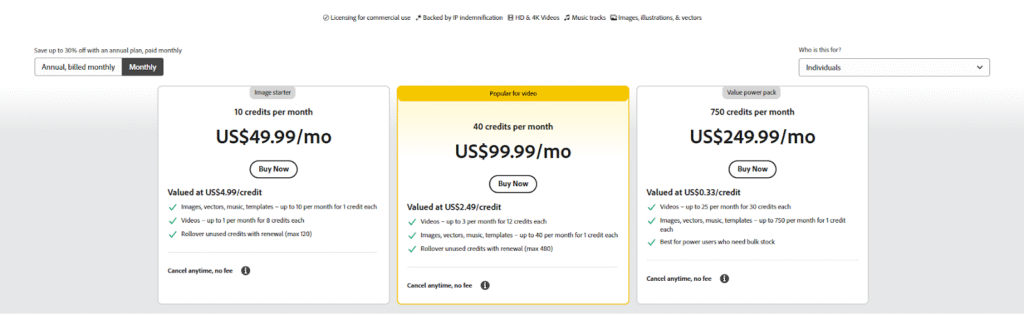
Typical monthly costs look like this:
- $49.99/month for 10 assets,
- $99.99/month for 40 assets,
- $299.99/month for 750 assets (highest limit plan).
Monthly plans have a straightforward price, but the Adobe Stock subscription cost per asset is generally higher because you’re paying for flexibility and no commitment.
Who Should Choose Monthly Plans?
Wondering if all that talk about Adobe Stock subscription cost and plan flexibility is actually meant for you? Let’s see who really benefits from going monthly.
- Casual Users with Occasional Stock Asset Needs
If you only need stock photos or videos from time to time, the monthly plan is perfect. It lets you pay for what you use without extra commitment.
- People Who Want the Flexibility to Cancel Anytime
Monthly subscriptions allow you to stop at any time without cancellation fees, making it ideal for those who want freedom from long contracts.
- Those New to Adobe Stock, Testing the Waters
If you’re just starting with Adobe Stock or unsure how often you’ll need assets, monthly plans let you try the service without a big upfront investment.
- Users with Uncertain or Project-Based Demand for Images
When your creative projects vary month to month, a monthly plan lets you scale your usage up or down easily to fit your current needs.
- Summary of Monthly Plans: Monthly plans offer flexibility and no long-term hassle, but tend to cost more per asset due to premium pricing for that freedom.
Yearly Plans: The Best Value for Consistent Use
If you expect to use Adobe Stock regularly, an annual plan paid monthly offers significant savings of around 30% per asset on average compared to monthly payments.
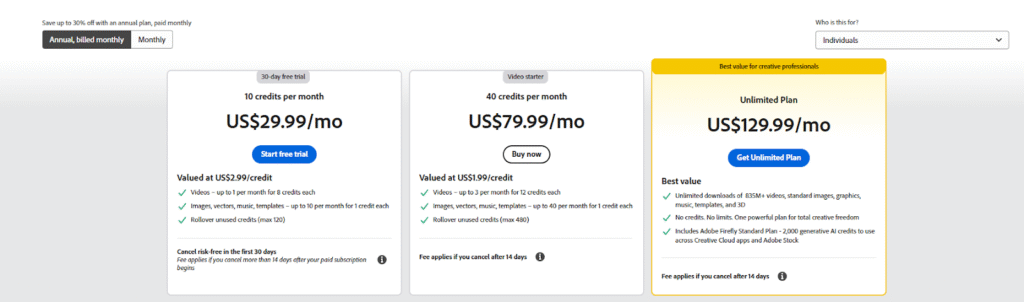
- 10-assets/month plan costs about $29.99 monthly (annual billing),
- 25-assets/month plan is $49.99 monthly (annual),
- 40-assets plan costs $79.99 monthly (annual),
- Unlimited plan available for $199.99 monthly (annual).
Yearly plans also often include rollover benefits, allowing unused assets to carry over to future months, a feature rarely available in monthly plans.
Who Should Choose Yearly Plans?
Not sure if committing to the long haul is really worth it? Let’s break down who actually gets the most out of yearly Adobe Stock subscription plans—because if you want the lowest Adobe Stock subscription cost, a steady content flow, and the best overall value, you’ll want to read on.
- Regular Users Who Need Monthly Downloads
If you consistently use Adobe Stock assets every month, yearly plans lower your costs significantly and provide a steady supply.
- Organizations and Freelancers Who Want to Save
For businesses or freelancers with ongoing creative demands, annual plans offer notable savings, often around 30% less compared to paying month-to-month.
- Anyone Who Values Rollover Benefits
Yearly subscriptions typically allow unused downloads to roll over to future months, so you don’t lose value on assets you didn’t use.
- Businesses That Rely on Consistent Creative Output
- Companies and agencies that need regular access to a large volume of assets find yearly subscriptions more cost-effective and predictable for budgeting.
- Summary of Yearly Plans
Yearly plans require commitment but reward it with clear cost savings, rollover perks, and reliable access to stock content.
So, if you crave consistent downloads, value budget predictability, and want to save big on your Adobe Stock subscription cost, the yearly plan is basically a no-brainer. In short, think long-term, and your wallet (and workflow) will thank you.
Subscription Cost Side-by-Side Comparison
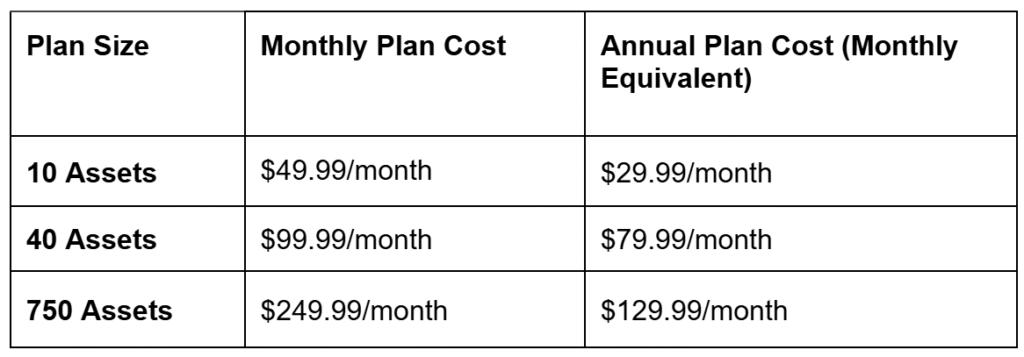
The entry-level 10 asset plan is only offered as a yearly subscription, so monthly subscribers will generally start with the 10 asset plan. Notably, annual plans come with added benefits such as rollovers of unused downloads, a real bonus if your usage varies.
What You Should Consider Beyond Price?
Choosing an Adobe Stock plan involves more than just looking at the subscription cost—you should also consider the additional features and benefits that can impact your overall experience and value.
- Rollover Credits: Save What You Don’t Use
Annual plans typically allow you to roll over unused downloads for up to 12 months. So, if you don’t download every asset allotted, you aren’t losing money, which maximizes value, especially useful if your usage spikes some months and drops others.
- Credit Packs: For Irregular or Small Needs
If you don’t want a subscription, Adobe Stock offers credit packs you can buy anytime. Each credit usually equals one asset download, but these packs tend to be more expensive per asset. Subscriptions remain the most economical choice for regular users.
- Asset Types Matter
Standard plans include photos, vectors, and illustrations, but videos (HD and 4K), premium, and 3D assets usually cost more or require separate or add-on plans. Annual plans provide better discounts for these premium assets.
- Built-in Creative Cloud Integration
One major advantage of Adobe Stock is how effortlessly it works inside Creative Cloud apps like Photoshop and Premiere Pro. This helps you preview, license, and add assets directly to your projects, a huge timesaver, no matter your plan.
- Plans for Teams and Enterprise
If you require Adobe Stock for multiple users or as part of a bigger business operation, Adobe offers special team and enterprise plans. These include features like shared licenses, collaborative tools, and priority support.
Overall, these extras can greatly enhance your subscription experience and should factor into your decision alongside the Adobe Stock subscription cost.
Conclusion
So there you have it. Choosing an Adobe Stock subscription isn’t only about monthly vs yearly plans or calculating costs. You also get rollover credits, flexible credit packs, Creative Cloud integration, and team options.
If you’re a regular downloader or run creative projects on repeat, annual plans give serious cost savings and useful perks. For casual users, monthly subscriptions keep things simple and easy. Don’t forget to check asset types, licensing terms, and compare offers with other stock photo sites before you make a choice. Adobe Stock subscription cost matters, but the features and extras really seal the deal or reveal the catch.

Leave a Reply