

Selling photos on Shutterstock opens the door to an exciting opportunity where you can actively turn your passion for photography into a steady income. Next, instead of letting your everyday shots go unused, you can simply upload them and start earning, whether it’s a breathtaking sunset, a bustling city street, or a perfectly plated meal. Moreover, by sharing your work on one of the world’s largest stock photo platforms, you gain exposure to millions of potential buyers. Consequently, you not only showcase your creativity but also effectively transform your visual ideas into real, ongoing earnings. Finally, with each upload, you move closer to building a profitable and rewarding photography business.
Shutterstock connects photographers and creators with millions of customers around the world looking to buy images, illustrations, and videos for their projects. It’s not just about uploading photos; it’s about joining a vibrant creative community where your art has value. This personal guide will help you navigate the simple steps to sell photos on Shutterstock successfully and maximize your earnings by making your portfolio stand out in a crowded marketplace. With persistence and a little strategy, your photography hobby can become a profitable online business.
What is Shutterstock and Why Should You Sell Photos There?
Shutterstock is a leading online stock content marketplace where businesses, marketers, advertisers, media companies, and bloggers search for fresh and unique photos and videos for their projects. As a photographer, you can use this platform to showcase your work on a global stage and earn royalties every time someone downloads your image. Shutterstock handles all licensing and payment processing, so you can focus on creating and uploading content.
With Shutterstock, you can turn your photography into passive income. Your content reaches millions of potential buyers worldwide, giving you more chances to earn from downloads. You can upload and sell photos, illustrations, vectors, and videos using anything from a smartphone to a professional camera.
Setting Up Your Shutterstock Contributor Account: Step-by-Step Guide
Before you can start to sell photos on Shutterstock and make money online, you need to set up your contributor account. This process is simple, free, and essential for legally uploading and selling your work on the platform. Here’s an easy step-by-step guide to help you start, along with clear explanations.
1. Visit the Shutterstock Contributor Portal:

First, visit the official Shutterstock Contributor website, which operates separately from the main site used by buyers. Head to submit.shutterstock.com to create your contributor account, where you can upload and sell your photos, illustrations, and videos. This dedicated portal makes the entire process easier by streamlining content submissions, approvals, and earnings management.
2. Sign Up by Providing Your Basic Details:
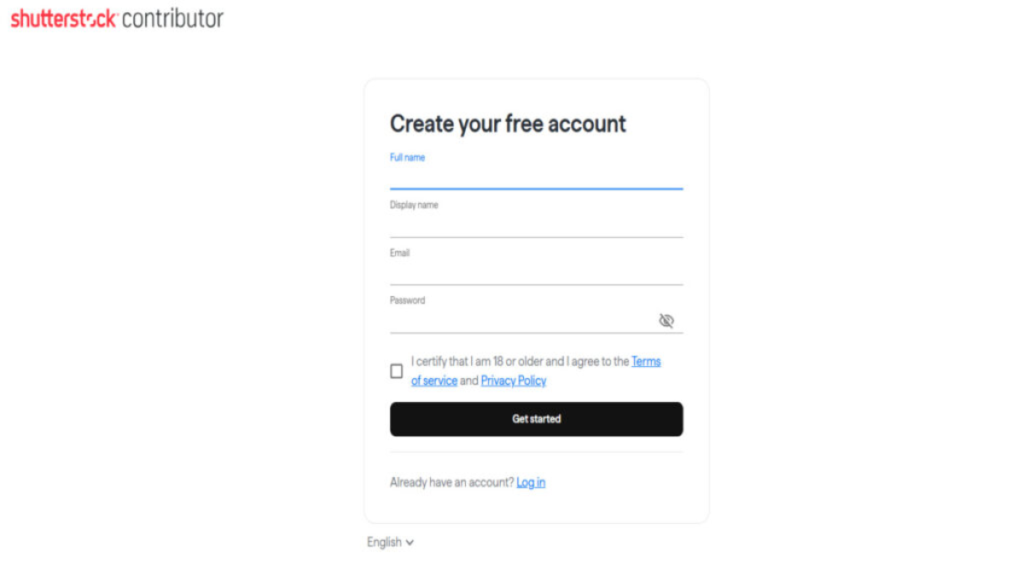
Next, once you open the contributor portal, click the “Sign Up” or “Get Started” button to begin your registration. After that, complete the online form by entering your essential personal details, such as your name, email address, and country.
- Your full legal name: This must reflect your official government ID or business name for payment and tax purposes.
- A display name: This is the public name buyers will see on your profile.
- Your email address: This should be valid and accessible, as important communications and verifications will be sent here.
- Create a strong password: Ensure your account is secure with a unique and robust password.
This step creates your contributor identity and access to the Shutterstock system.
3. Confirm Your Email Address:
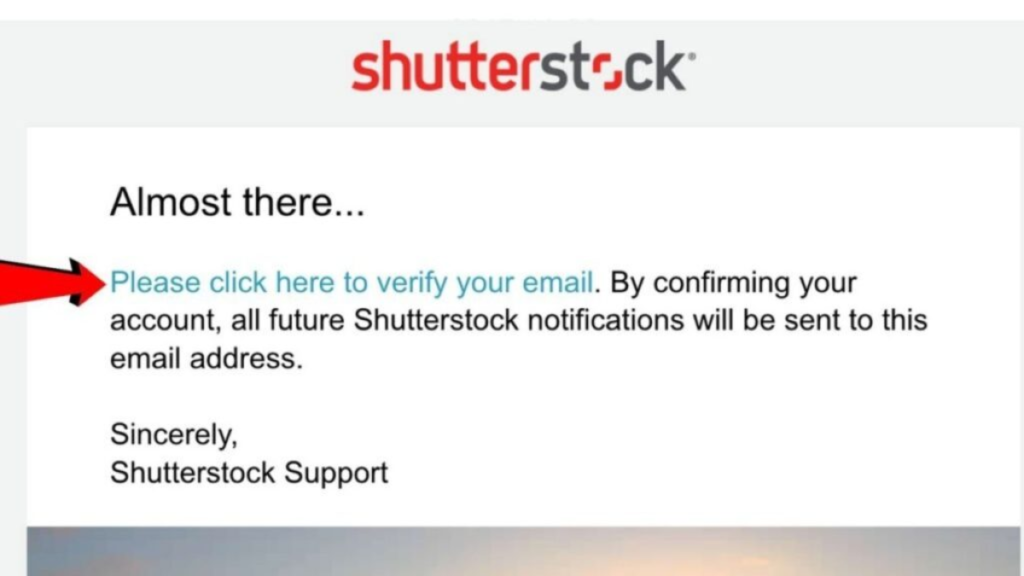
After submitting your registration details, Shutterstock will send a verification email to the address you provided. This is a crucial security step to confirm that you are the rightful owner of the email account. To proceed, open your email inbox, find the message from Shutterstock, and click the verification link inside. If you don’t see it, check your spam folder just in case. Completing the email verification activates your account and allows you to continue with the setup process.
4. Complete Your Profile with Accurate Information:
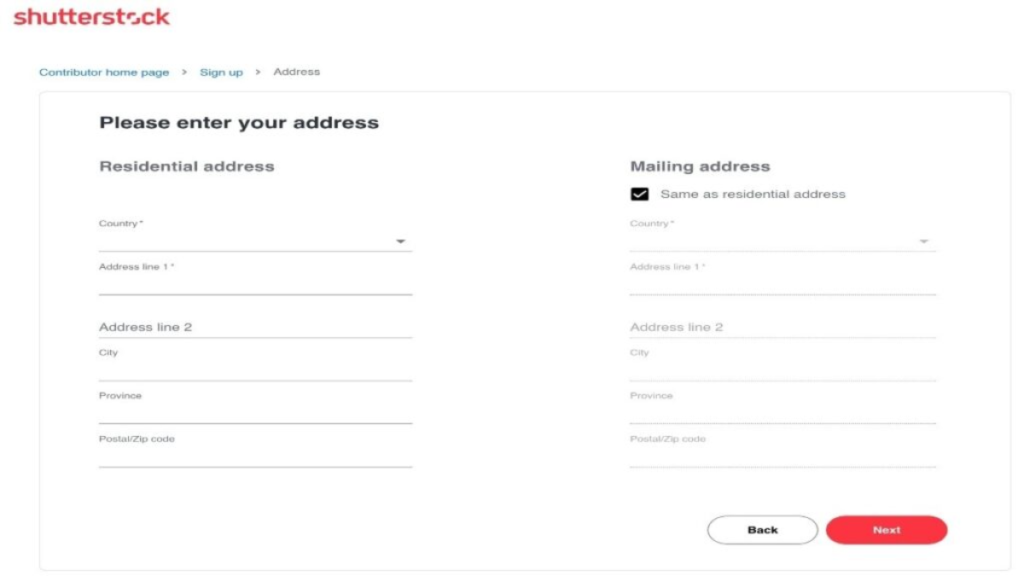
Next, you’ll need to provide a detailed profile and contact information. Enter your residential address as required by Shutterstock for legal compliance and payment processing. If your mailing address differs from your residential address, provide that as well. Add any other requested information, including payment details such as your preferred payment methods (PayPal, Payoneer, etc.), to ensure you receive your royalties without delay.
Accuracy here is key to avoiding any payment or communication issues in the future. All address information should be typed in English, and it must be up-to-date.
5. Access Your Contributor Dashboard and Start Uploading:
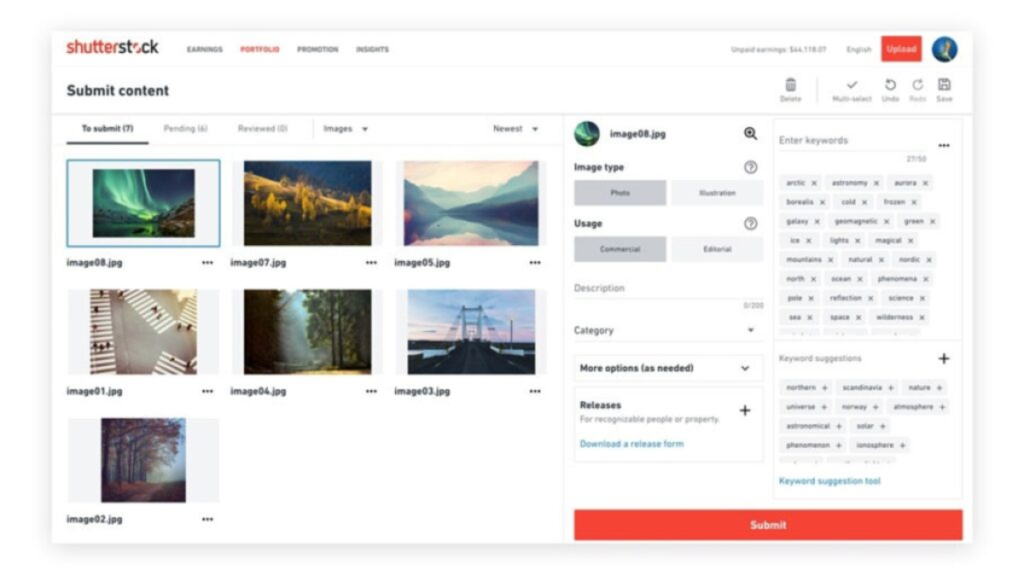
Once your registration and profile are fully complete and verified, Shutterstock grants you access to the contributor dashboard. This is your control center to upload your photos, track submissions, review sales activity, and manage your payoutWith your account properly set up, you can begin submitting photos for review.
Shutterstock’s content review team will evaluate your first uploads for quality and compliance with their guidelines. After your first few photos are approved, your contributor status becomes fully active, allowing you to upload unlimited content and start earning royalties.
What Kind of Photos Sell Best on Shutterstock?
Success in selling photos on Shutterstock largely depends on submitting quality photos that meet buyer demands:
- Image Quality: Use high-resolution cameras or smartphones with good optics. Photos must be sharp, well-lit, and free of noise or distortion. The minimum resolution requirement is typically 4 megapixels, but higher is encouraged.
- Popular Subjects: Business, technology, people in authentic moments, travel scenes, nature, food, lifestyle, and seasonal themes tend to sell well consistently.
- Model Releases: If your photos feature recognizable people, you need to upload signed model releases. This unlocks broader commercial use.
- Unique and Versatile Content: Stock buyers look for photos they can use repeatedly in marketing materials. Versatile photos with clean backgrounds or lots of negative space are easier to place in designs.
- Trendy Topics: Keep an eye on Shutterstock’s trending categories and stock photo demand reports to create content that is currently sought after.
Diverse subject matter and consistently high-quality photos that cater to the needs of marketers and content creators greatly increase your sales potential.
Requirements to Sell Photos on Shutterstock
Before you start uploading, it’s important to understand Shutterstock’s requirements. These guidelines ensure that buyers receive high-quality content and reduce the chances of rejection.
Age Requirement: You must be at least 18 years old to join the Shutterstock Contributor Program.
Acceptable Devices: A DSLR or mirrorless camera is ideal, but many smartphone images are now accepted, especially those shot in good lighting with strong clarity.
Image Quality Standards
- Minimum resolution: 4 megapixels
- No visible noise, blurriness, or pixelation
- Proper lighting and composition
- No copyrighted elements like logos or branded products
Technical Formatting
- File type: JPEG
- Maximum size: 50 MB
- Correct model or property releases for photos featuring identifiable people or private locations
Meeting these requirements makes your contributor journey smoother and increases your chances of getting approved.
Tips to Maximize Earnings Selling Photos on Shutterstock
To consistently sell photos on Shutterstock and maximize your income, consider these proven tips from successful contributors:
- Upload Regularly and Consistently: The more quality photos you add, the higher your chances of sales. Aim for a steady workflow rather than sporadic bursts.
- Focus on Quality Over Quantity: A smaller portfolio of exceptional photos earns more than large volumes of average work.
- Build Collections Around Themes: Grouping photos by theme (e.g., “summer travel,” “remote work,” “healthy eating”) attracts niche buyers looking for specific image types.
- Capitalize on Trends: Follow Shutterstock’s editorial reports and stock photo trends to produce in-demand content quickly.
- Optimize Titles and Keywords with SEO in Mind: Use keyword research tools to find high-volume search terms that buyers use.
- Promote Your Portfolio Outside Shutterstock: Share your work on social media, photography forums, and your website, driving more traffic and sales.
- Be Patient and Learn from Feedback: Review photos that get rejected or underperform to improve your shooting, editing, or keyword strategies.
Many photographers start small but increase their monthly royalties significantly by refining their process and taking a strategic approach to selling photos online.
Understanding Shutterstock’s Payment System and Contributor Levels
Shutterstock pays contributors royalties based on how many times their photos are downloaded:
- Royalty Structure: Contributors earn between approximately 15% to 40% commission, depending on their tier level, which is determined by cumulative lifetime downloads.
- Earnings Per Download: Payouts range roughly from $0.10 to $5.80 per photo download, with higher rates for extended licenses or exclusive content.
- Minimum Payout: The payout threshold typically starts at $35. Once you reach that amount, you can request payment.
- Payment Methods: PayPal, Payoneer, and Skrill are some of the common payment options.
- Contributor Rankings: As you accumulate more downloads and sales, your tier rises, unlocks higher royalties, and opens up additional features like custom profile links.
This system rewards steady, high-quality contributions and motivates ongoing content creation.
Final Thoughts
If you want to sell photos on Shutterstock and make money online, start today by creating your contributor account and uploading your best work. Focus on quality, optimize your metadata with keywords, and keep learning from feedback. Be patient as you build your portfolio and earnings because success comes with persistence.
Remember: Selling photos on Shutterstock is both an art and a business; it requires creativity, discipline, and marketing. But with the right approach, you can turn your passion into a rewarding online income stream.
This complete guide, enriched with real photographer stories and actionable tips, empowers you to confidently sell photos on Shutterstock and achieve your financial goals. Start uploading, keep improving, and watch your earnings grow.
