
Did you know that 53% of visitors abandon websites that take longer than 3 seconds to load? That’s more than half your potential customers vanishing before they even see your products. Slow loading times aren’t just frustrating, they’re costing you real money. Moreover, every second counts in today’s fast-paced digital marketplace where attention spans are shorter than ever.
Website speed directly impacts your bottom line in remarkable ways. Studies show that a 1-second improvement can boost mobile conversions by 27%. Additionally, sites loading in just 1 second convert three times better than those taking 5 seconds. In this guide, you’ll discover 10 proven methods to speed up Shopify website performance and transform browsers into buyers. Furthermore, with Google’s Core Web Vitals now a ranking factor, optimizing your store’s speed isn’t optional, it’s essential for staying competitive. Ready to get started? Build your optimized store with Shopify and implement these game-changing strategies.
Why Website Speed Matters for Shopify Stores?
Speed isn’t just a technical metric it’s a critical business driver. Research reveals that a 1-second delay causes a 7% reduction in conversions. Similarly, sites loading in 1 second convert 3x better than those taking 5 seconds. Even better, mobile conversions can surge by 27% with just a 1-second improvement, proving why many merchants focus on strategies to Speed Up Shopify Website performance.
Three Critical Reasons Speed Matters:
User Experience & Customer Retention:
In fact, 70% of consumers say page speed affects their purchasing decisions. Consequently, high bounce rates from slow sites damage your brand perception and trust.
SEO Rankings & Visibility:
Google’s Core Web Vitals now serve as a ranking factor in search results. Therefore, faster sites rank higher and attract more organic traffic. This ultimately leads to more potential customers discovering your store.
Revenue & Profitability:
Consider this example: a store with a $60 average order value and 5,000 daily visitors could lose $9,000 per day from a 1-second delay. Additionally, faster sites enjoy lower advertising costs due to better Quality Scores on platforms like Google Ads. Whether you’re just starting out or optimizing an existing store, understanding how to build a Shopify store with speed in mind from day one sets you up for long-term success.
Whether you’re launching or optimizing, using proven methods to Speed Up Shopify Website performance sets you up for long-term success.

Understanding Shopify Speed Metrics
Shopify Speed Score: Before optimizing, you need to understand what you’re measuring. Shopify’s Speed Score analyzes your store’s loading performance across multiple factors. This score ranges from 0-100, with higher numbers indicating better performance.
Core Web Vitals Explained:
- LCP (Largest Contentful Paint) measures how fast your main content loads.
- FID (First Input Delay) tracks how quickly your site responds to user interactions.
- CLS (Cumulative Layout Shift) evaluates the visual stability of page elements.
Benchmarking Your Store: Generally, a speed score above 50 is considered good. However, optimal performance requires a score of 70 or higher. You can check your scores using Google Page Speed Insights or your Shopify Admin dashboard. Both tools provide detailed insights into your store’s performance and improvement opportunities.
10 Proven Ways to Speed Up Shopify Website
Now, let’s explore the most effective strategies to speed up Shopify website performance. Each method delivers measurable results when implemented correctly. Furthermore, these techniques work together to create a lightning-fast shopping experience.
1. Optimize and Compress Images for Lightning-Fast Loading
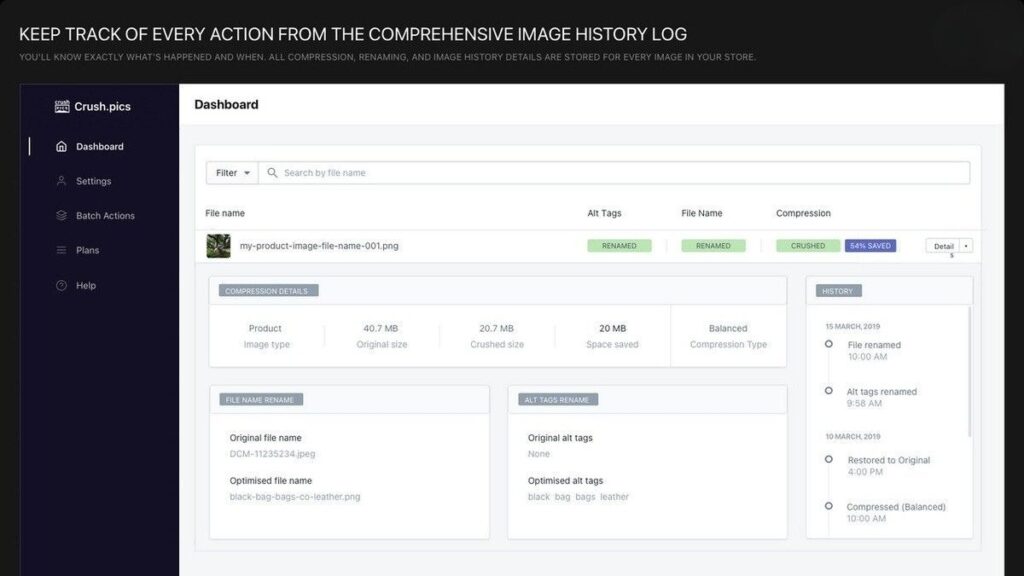
Images typically account for 60-70% of your page weight. Therefore, unoptimized images are the number one cause of slow Shopify stores. Fortunately, modern compression techniques can dramatically speed up Shopify website performance without sacrificing visual quality.
Start by converting images to WebP format, which is 30% smaller than JPEG or PNG. This modern format maintains quality while significantly reducing file size. Next, resize images to exact display dimensions rather than using CSS to shrink them. Shopify recommends a maximum width of 2048px for product images.
Additionally, enable lazy loading to improve initial page speed. This technique loads images only as users scroll down the page. Consequently, it reduces initial page load time dramatically. Fortunately, Shopify 2.0 themes have built-in lazy loading functionality.
Use compression tools like TinyPNG or Shopify apps such as TinyIMG before uploading. Always aim to keep each image under 200KB for optimal performance. These simple steps can reduce page load time by 40-60%, making a massive difference in user experience and conversions.
2. Choose a Speed-Optimized Shopify Theme

Your theme’s code quality directly affects overall performance. Minimalist themes feature cleaner code, which naturally loads faster. Therefore, choosing the right theme is crucial to speed up Shopify website loading times.
Consider Dawn, Shopify’s free, speed-focused theme built specifically for performance. Alternatively, explore other Online Store 2.0 themes designed with speed in mind. For fashion stores, discover our collection of Shopify apparel themes optimized for both aesthetics and performance. Always test theme speed using Page Speed Insights before making a purchase decision.
Avoid theme bloat by selecting themes with only necessary features. Overly complex, feature-heavy themes often sacrifice speed for functionality. Moreover, ensure you’re using the latest version rather than pirated or outdated themes. Outdated themes frequently contain unoptimized code that slows your store.
Review your theme customization settings regularly. Turn off features you don’t actively use on your site. Remember, each disabled feature means fewer resources consumed during page loads. This simple audit can improve load time by 30-50%, delivering immediate results.
3. Minimize and Audit Shopify Apps

Apps are simultaneously helpful and problematic for site speed optimization. Each app adds scripts, CSS files, and tracking codes to your store. Unfortunately, apps represent the primary cause of Shopify store slowdowns. The average store runs 6-10 apps, yet many are redundant or unused.
Begin by conducting a thorough app audit. List all installed apps and identify which ones you actively use. Then, check each app’s impact using Shopify’s speed report in your admin dashboard.
Uninstall apps you tried but no longer need. Delete apps that provide minimal value to your operations. However, remember that apps often leave code behind even after uninstalling. Contact the developer or use app uninstaller tools to remove leftover code completely.
Consolidate app functions whenever possible to speed up Shopify website performance. Replace multiple single-purpose apps with one comprehensive solution. For example, use one SEO suite instead of separate apps for meta tags, image optimization, and sitemaps. Explore our guide to the best SEO apps for Shopify to find consolidated solutions that boost rankings without slowing your store.
Keep only apps critical to your store’s operations. Review your app portfolio quarterly and remove non-performers. Removing just 3-5 unnecessary apps can improve load time by 20-35%, delivering faster performance immediately.
4. Implement Lazy Loading for Videos and Heavy Content
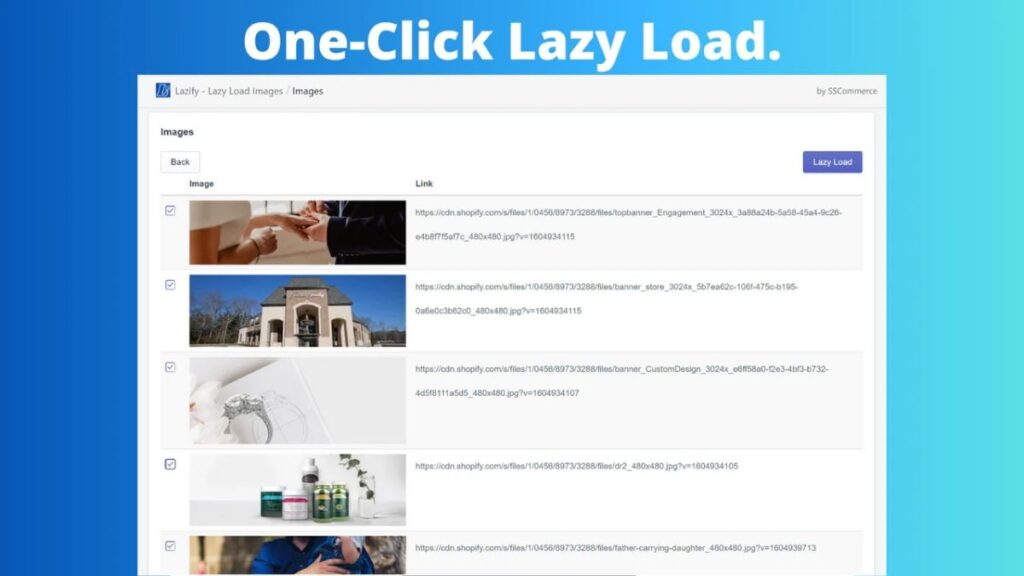
Videos and embedded content consume massive bandwidth. Consequently, they slow down your initial page load significantly. Lazy loading solves this problem by loading content only as users scroll to it.
Enable lazy loading for product videos, YouTube or Vimeo embeds, and background videos. Additionally, apply it to image galleries below the fold to reduce initial page weight substantially and help Speed Up Shopify Website performance.
Shopify 2.0 themes include built-in lazy loading functionality. However, older themes require apps or custom code for implementation. Consider the lazy sizes library for advanced control over lazy loading behavior.
Follow video best practices to maximize performance gains. Avoid autoplay videos, especially on mobile devices where data is limited. Instead, host videos externally on platforms like YouTube or Vimeo. Use thumbnail images that load videos only when users click them.
Furthermore, compress videos before uploading to reduce file sizes. These techniques can reduce initial page weight by 50-70%, creating a noticeably faster store experience.
5. Reduce HTTP Requests and Fix Broken Links
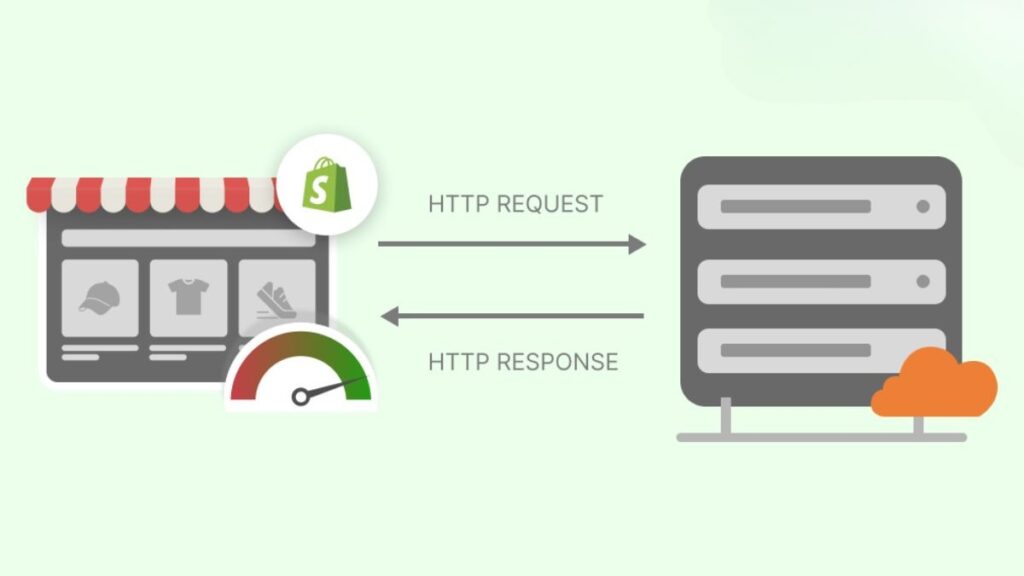
Each page element requires a separate HTTP request to load. Images, scripts, and CSS files all generate individual requests. Therefore, fewer requests result in faster loading times overall.
Minimize HTTP requests by combining CSS files where possible. Reduce the number of fonts to just 2-3 font families maximum. Limit external scripts and widgets that add unnecessary requests to your pages.
Fix broken links regularly to prevent wasted server resources. Use tools like Broken Link Checker to scan for dead product pages and missing images. Update or remove broken links monthly to maintain optimal performance.
Optimize your redirects carefully to speed up Shopify website loading. Avoid redirect chains where page A redirects to page B, which redirects to page C. Use 301 redirects instead of 302s for better SEO performance.
Minimize your total number of redirects across the site. Never redirect to another redirect, as this creates unnecessary delays. Remember, each redirect adds 0.5-1 second to load time. These optimizations can improve load time by 15-25% with relatively little effort.
6. Use a Content Delivery Network (CDN)
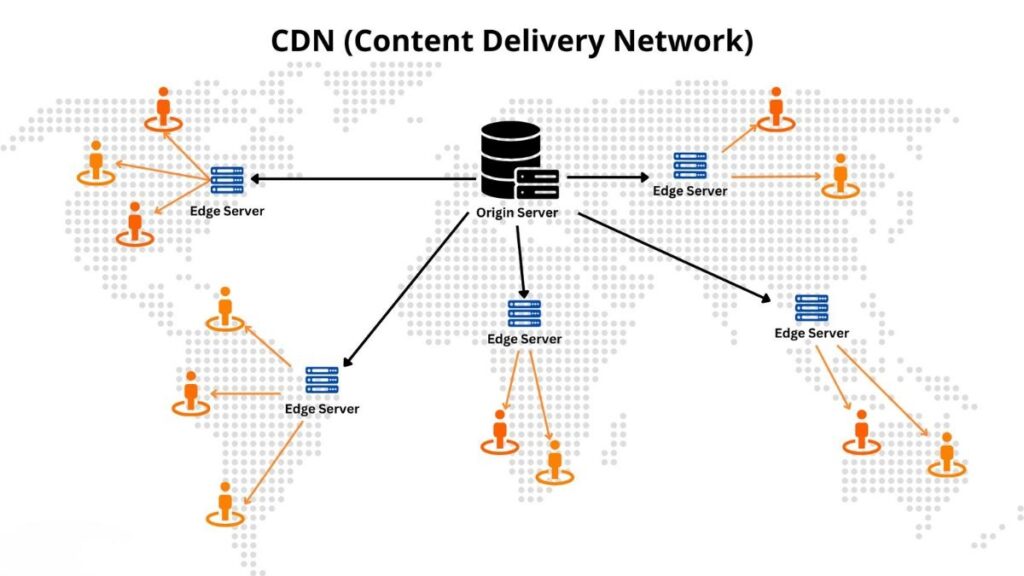
CDNs store your site on multiple servers worldwide and deliver content from the server closest to each user. Consequently, this dramatically reduces server response time and improves global performance, making it one of the most effective ways to speed up Shopify Website speed.
Good news: Shopify includes CDN automatically for all stores. No setup is required it works right out of the box. This built-in feature covers all Shopify stores globally, ensuring consistent performance.
Ensure images and assets are stored on Shopify’s CDN. Avoid hosting files on external, slow servers whenever possible. Additionally, use Shopify’s image transformation features to optimize delivery further.
For custom apps, consider Cloudflare integration for additional speed. External assets should also use CDN delivery for maximum performance. Monitor your CDN cache effectiveness regularly to ensure optimal configuration. Unlike competitors, Shopify’s CDN is 2.8-3.9x faster on average according to Google’s research. This built-in benefit ensures global performance consistency without additional configuration or costs.
7. Optimize Code: Minify CSS, JavaScript, and Liquid Code

Code minification removes unnecessary characters from your code. This process eliminates whitespace, comments, and unused code sections. Consequently, smaller file sizes download faster, improving browser processing efficiency.
Use apps like “Minifier” or “Booster” to minify CSS and JavaScript automatically. These tools remove whitespace and comments while combining multiple files when possible. This optimization helps speed up Shopify website performance significantly.
Clean up your Liquid code by removing commented-out sections. Eliminate redundant loops and queries that slow processing. Optimize your theme.liquid structure for maximum efficiency. Hire a developer if needed for complex cleanup tasks.
Defer non-critical JavaScript to prioritize essential content loading. Load critical scripts first, then defer analytics and tracking scripts. Use async loading for third-party scripts to prevent blocking page rendering.
Audit font usage across your site regularly. Remove unused custom fonts and limit selections to 2-3 font families. Consider using system fonts where appropriate for faster loading. Code optimization can improve speed by 10-20% with proper implementation.
8. Leverage Browser Caching and Server Response Time

Caching stores static files locally on each visitor’s device. Therefore, repeat visitors load pages almost instantly without re-downloading everything. This reduces server load and bandwidth usage significantly.
Shopify handles most caching automatically for you. However, set appropriate cache headers for custom content when needed. Use apps like “PageSpeed Guru” for advanced caching configuration options.
Optimize server response time for better performance. Your Time to First Byte (TTFB) should stay under 200ms. Fortunately, Shopify’s servers are optimized and perform 2.8x faster than competitors according to Shopify’s performance research.
Avoid server-side slowdowns caused by poorly optimized apps. Regularly clean old orders and customer data from your database. Archive unused products instead of deleting them completely. Additionally, limit product variants to reasonable numbers to maintain database efficiency. For dropshipping stores managing large product catalogs, discover our curated best apps for dropshipping that balance functionality with speed optimization.
Shopify’s platform handles most server optimization automatically. This built-in benefit improves repeat visitor experience by 60-80% without requiring technical expertise.
9. Implement Accelerated Mobile Pages (AMP) for Mobile Speed

Mobile devices generate 78% of Shopify traffic today. Therefore, mobile optimization is absolutely critical for success. AMP pages load nearly instantly, typically under 1 second. Moreover, Google caches AMP pages for ultra-fast delivery worldwide.
AMP uses stripped-down HTML versions of your pages, helping you significantly Speed Up Shopify Website performance. This format prioritizes speed over complex functionality. Consequently, it’s ideal for blog posts and content pages where speed matters most.
Consider using AMP for blog posts, articles, and landing pages from paid ads. Product pages work with AMP too, though with some considerations. Implementation requires either Shopify AMP apps or working with a developer for custom templates.
Test functionality thoroughly before rolling out AMP site-wide. Remember, AMP may limit some design and feature options. You’ll need to maintain two versions of pages simultaneously. However, measure conversion impact carefully to ensure the speed benefits outweigh any limitations.
Mobile pages can load 3-4x faster with AMP implementation. This dramatic improvement creates exceptional user experiences on mobile devices, where speed matters most.
10. Manage Third-Party Scripts with Google Tag Manager

Third-party scripts slow sites through analytics, pixels, and chat widgets. These elements load synchronously, blocking other page elements. Google Tag Manager solves this problem by loading scripts asynchronously instead.
GTM centralizes all tracking code management in one place. It prevents scripts from blocking page rendering during load. Therefore, implementing GTM is crucial to speed up Shopify website performance effectively.
Create a free GTM account to get started. Install the GTM container on your Shopify store. This feature is available to Shopify Plus stores and those using custom pixels.
Migrate existing scripts to GTM systematically. Move Facebook Pixel, Google Analytics, and conversion tracking pixels. Implement chat widgets through GTM for better control and performance.
Set loading priorities with critical scripts loading first. Use triggers to load scripts only when needed on specific pages. Delay non-essential scripts until after the main page loads completely.
Review and remove unused tags regularly to maintain optimal performance. Test tag firing accuracy to ensure tracking works correctly. Monitor GTM’s impact on speed through your analytics dashboard. This strategy can reduce third-party script impact by 30-50% according to Google’s Tag Manager documentation.
Measuring Your Speed Improvements
Essential Tools for Tracking:
Tracking progress is essential for effective Shopify page speed optimization, especially when you’re working to Speed Up Shopify Website performance.Use Google PageSpeed Insights for free, comprehensive analysis of your store. Additionally, check Shopify’s Speed Report built directly into your admin dashboard.
GTmetrix provides detailed waterfall analysis showing exactly what loads when. Google Search Console monitors Core Web Vitals trends over time. Together, these tools give you complete visibility into performance. Once you’ve measured your baseline, consider switching to minimal Shopify templates that naturally load faster due to their clean, streamlined code.
Key Metrics to Track:
Track before and after speed scores to measure improvement accurately. Compare load times on mobile versus desktop devices regularly. Monitor Core Web Vitals trends over 28-day periods to identify patterns. Most importantly, track conversion rate changes correlated with speed improvements.
Testing Best Practices:
Test multiple times for accuracy since results can vary. Check performance on various devices and connection speeds. Use incognito mode to avoid cache interference during testing. Furthermore, monitor performance during peak traffic hours when loads are highest.
Setting Goals:
Set clear goals for your optimization efforts as you work to Speed Up Shopify Website performance. Target page loads under 2 seconds for best results. Aim for a 70+ Shopify speed score consistently. Pass all Core Web Vitals thresholds to satisfy Google’s requirements. Finally, monitor bounce rate improvements as speed increases over time.
Common Mistakes to Avoid When Optimizing Speed
- Making Too Many Changes at Once: Avoid making too many changes at once without testing. Instead, test one optimization at a time to track each change’s impact.This approach prevents breaking functionality while identifying what works best, especially when you’re trying to Speed Up Shopify Website performance.
- Neglecting Mobile Optimization: Don’t neglect mobile optimization when most traffic comes from mobile. Test mobile speed separately from desktop performance. Prioritize mobile-first improvements to serve your largest audience segment effectively.
- Removing Essential Functionality: Never remove essential functionality just for speed gains. Balance speed improvements with user experience requirements carefully. Don’t sacrifice critical features that drive conversions. Always test conversion rates, not just speed scores alone.
- Ignoring Regular Maintenance: Ignoring regular maintenance leads to gradual speed degradation. Site speed naturally degrades over time as you add content and apps. Schedule quarterly audits to maintain peak performance consistently. Remember, new apps and content continuously add weight to your store.
- Not Testing After Updates: Always test after theme updates or major changes. Theme updates can accidentally break previous optimizations you’ve implemented. New apps may slow your store more than expected. Monitor speed continuously rather than treating it as a one-time project, ensuring you consistently work to Speed Up Shopify Website performance.
Conclusion
Speed optimization transforms your Shopify store’s performance and profitability. These 10 proven methods deliver measurable improvements when implemented systematically. Start with quick wins like image optimization and app audits today to help Speed Up Shopify Website performance. Measure your baseline speed using Google PageSpeed Insights, then implement optimizations one at a time. Monitor conversion rate impacts closely and make speed monitoring a monthly routine to maintain peak performance.
Every second truly matters for your bottom line and revenue growth. Faster stores create happier customers who buy more frequently. Don’t let slow loading times continue costing you valuable revenue unnecessarily. Ready to build a lightning-fast Shopify store? Get started with Shopify today and leverage their speed-optimized infrastructure. Give your customers the fastest shopping experience possible and watch your conversions soar.
Pro Tip: Bookmark this guide and revisit it quarterly to maintain peak performance!
